Android app
The joinstr app for Android is written in Kotlin Multiplatform. It uses a Bitcoin Core node you run yourself for coins, signing, fee estimates and broadcast. It ships its own Tor.
| Latest version | 0.3.0, released 2026-09-22 |
| Requires | Android 7.0 or newer, a Bitcoin Core node reachable from the phone |
| Networks | Mainnet, testnet4, signet, regtest (follows the node) |
| Transport | Tor (built in) or VPN |
| Source | gitlab.com/invincible-privacy/joinstr-kmp |
Download and verify
Download from the releases page.
Verify the files before installing.
gpg --keyserver hkps://keys.openpgp.org --recv-keys 9253062A4F92D63459085CA62D230520212A5901
gpg --verify Joinstr_v0.3.0_release.apk.asc Joinstr_v0.3.0_release.apk
sha256sum -c SHA256SUMS_v0.3.0
The APK is signed with a certificate whose SHA-256 fingerprint is the following. Tools such as apksigner verify --print-certs or AppVerifier show it.
Releases before 0.2.0 used a different certificate. If you have 0.1.x installed, uninstall it before installing 0.3.0.
Prepare your node
The app talks to Bitcoin Core over RPC, usually on your home network. Let the node accept RPC from the phone's network and give it a user name and password. The example below is for a node at 192.168.1.10 in a 192.168.1.0/24 network.
server=1
rpcbind=127.0.0.1
rpcbind=192.168.1.10
rpcallowip=127.0.0.1
rpcallowip=192.168.1.0/24
rpcuser=<user>
rpcpassword=<a long random password>
Add signet=1 or testnet4=1 to use a test network. Then put the RPC settings under the matching [signet] or [testnet4] section. Only allow RPC from networks you trust. RPC traffic is not encrypted.
The node needs a wallet holding the coin you want to mix.
Set up the app
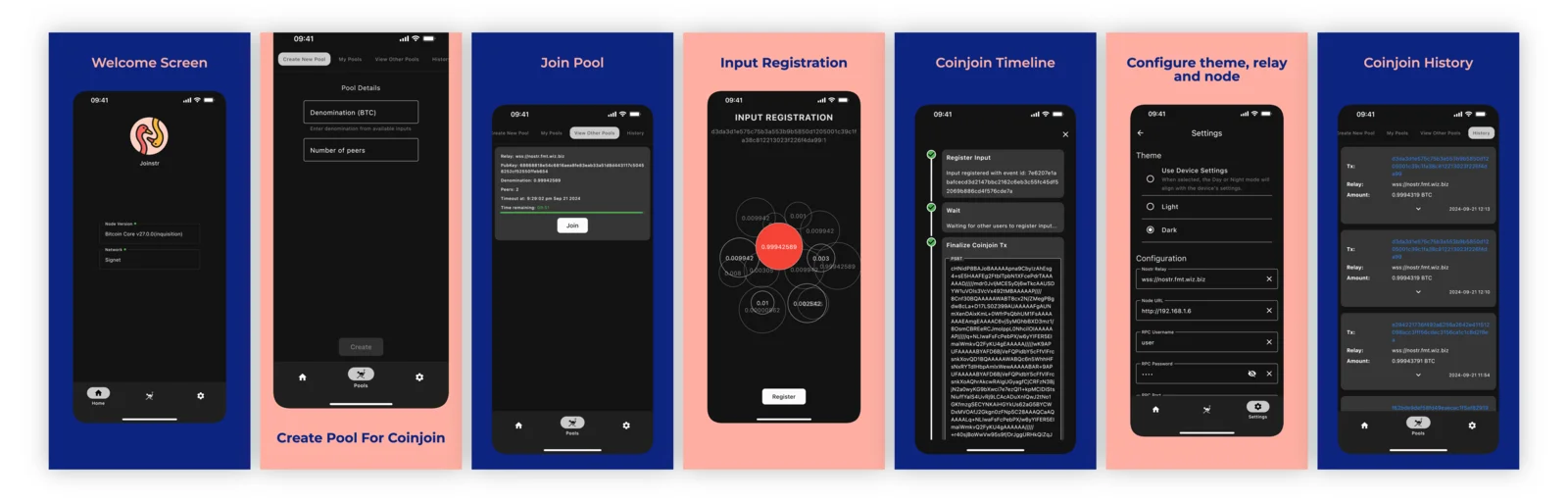
- Open Settings.
- Enter a Nostr Relay such as
wss://nos.lol. - Enter the Node URL (for example
http://192.168.1.10), RPC Port, RPC Username and RPC Password. - Pick the Wallet to use and tap Save.
- On the home screen, check that the node version and network are shown.
The app starts Tor by itself and shows Connected to Tor once it is ready.
Make a coinjoin
- Prepare a coin in the node's wallet worth the denomination plus 500 to 5000 sats.
- Open Pools. Either create a pool on Create New Pool with a denomination and number of peers, or open View Other Pools and tap Join on an existing one.
- When all outputs are registered, pick your coin on the input registration screen and tap Register. Your node signs it with
SIGHASH_ALL|ANYONECANPAY. - The Coinjoin Timeline shows each step. When every peer has signed, the app checks and broadcasts the transaction through your node.
- Finished coinjoins appear under History.
Before signing, the app refuses rounds that would cost more than 15000 sats, outputs below the dust limit and registrations that could be broadcast on their own. It only accepts pool credentials from the creator of the pool you joined.
Notes
- Pools that require an aut-ct proof show why they cannot be joined. aut-ct works in the desktop build only.
- Pool messages go to the relay the pool names, not the one in Settings.
- iOS and desktop builds can be made from source. Only Android has signed releases.