Electrum plugin
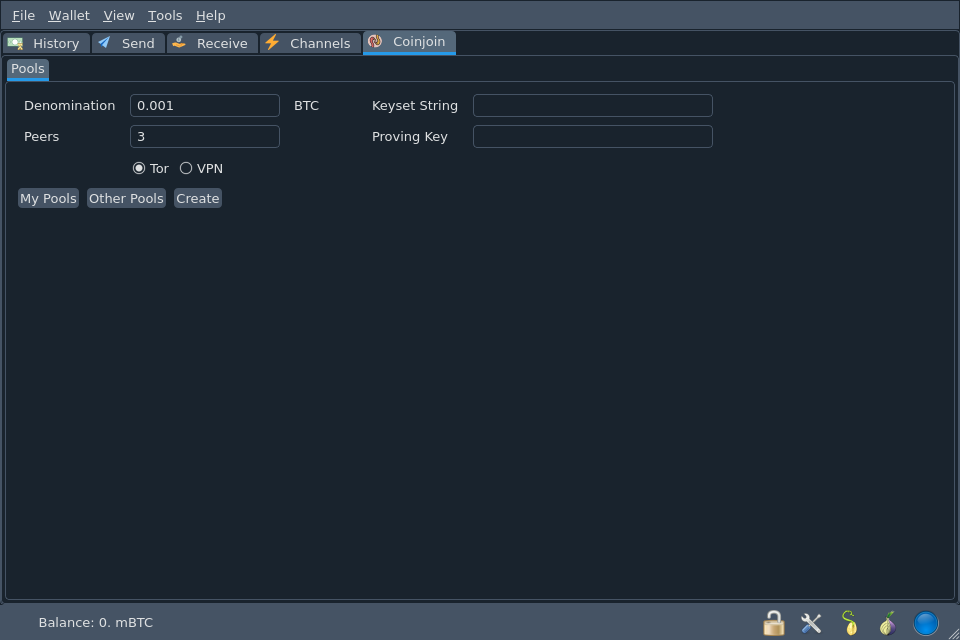
The Electrum plugin adds a Coinjoin tab to Electrum. It is the reference implementation of joinstr and the only client with every feature, including the VPN transport, aut-ct sybil resistance and headless use through the Electrum daemon.
| Latest version | 0.4.2 |
| Requires | Electrum 4.6.0 or newer, Tor |
| Source | gitlab.com/invincible-privacy/joinstr/-/tree/main/plugin |
| Release notes | doc/release-notes/plugin |
Requirements
- Electrum 4.6.0 or newer. The plugin uses the plugin API that Electrum introduced in 4.6.0. Mutinynet needs 4.6.2 or newer.
- Any Electrum build. Since 0.4.2 the plugin works in the AppImage, the Windows and macOS binaries and Electrum run from Python sources. Earlier versions needed the
coincurvepackage and only loaded in Electrum run from Python sources. - Tor. The plugin refuses to talk to a relay without a SOCKS5 proxy, unless you create a VPN pool. Tor Browser provides one on port 9150 and the
torservice on port 9050.
aut-ct pools also need the websockets, autctapi and argon2-cffi packages, which the Electrum binaries do not include, plus the aut-ct binary. Use Electrum run from Python sources for them. See aut-ct pools.
Install
- Download
joinstr.zipandjoinstr.zip.ascfor the latest version from plugin/zip/v0.4.2. -
Verify the signature.
gpg --keyserver hkps://keys.openpgp.org --recv-keys 9253062A4F92D63459085CA62D230520212A5901
gpg --verify joinstr.zip.asc joinstr.zip
The output must say
Good signature from "/dev/fd0 <alicexbt@protonmail.com>". -
In Electrum, open Tools > Plugins and click Add. Select
joinstr.zip. - The first time you add an external plugin, Electrum asks you to set up plugin authorization. Follow its prompts.
- Enable joinstr in the plugin list. The Coinjoin tab appears.
To install from source instead, copy the contents of plugin/ into a joinstr directory inside Electrum's plugins directory.
Set up Tor
Open Tools > Network > Proxy, enable the proxy, choose SOCKS5 and enter 127.0.0.1 with port 9050 (or 9150 for Tor Browser).
The plugin opens a new Tor circuit for every nostr operation by sending a random SOCKS username. Relays on localhost are reached directly.
Settings
Open Tools > Plugins, click joinstr and then Settings.
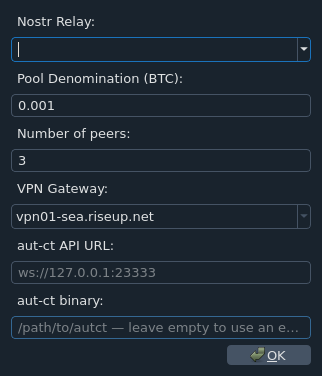
| Setting | Config key | Default |
|---|---|---|
| Nostr Relay | plugins.joinstr.relay |
wss://nos.lol |
| Pool Denomination (BTC) | plugins.joinstr.pool_denomination |
0.001 |
| Number of peers | plugins.joinstr.num_peers |
3 |
| VPN Gateway | plugins.joinstr.vpn_gateway |
first Riseup gateway |
| aut-ct API URL | plugins.joinstr.autct_api_url |
ws://127.0.0.1:23333 |
| aut-ct binary | plugins.joinstr.autct_binary |
none |
The relay list offers the relays Electrum already knows. You can type any wss:// URL. The relay you set here is where the plugin looks for pools and where your own pools run. When you join someone else's pool, the plugin uses the relay that pool names.
Create a pool
- Make sure you have a confirmed coin worth the denomination plus 500 to 5000 sats.
- Open the Coinjoin tab.
- Enter the Denomination in BTC and the number of Peers.
- Leave Tor selected. Choose VPN only if every peer should share a Riseup gateway.
- Leave Keyset String and Proving Key empty unless you want an aut-ct pool.
- Click Create.
The pool is announced on your relay and stays open for 10 minutes. You can also right click a confirmed coin in the Coins tab (View > Show Coins) and choose Coinjoin > Create Pool.
Join a pool
- Click Other Pools. The plugin lists open pools on your relay with their denomination, number of peers, time left, requirements and relay.
- Select a pool and click Join. Right clicking a coin and choosing Coinjoin > Join Pool finds pools that fit that coin.
- The plugin sends the join request and shows a Relay Payment QR code with your new one time nostr public key. If the pool's relay charges for writes, use it to pay the relay. For a free relay, or one you have already paid, click Continue.
During the round
The rest happens on its own.
- The plugin registers a fresh address from your wallet as your output.
- When every peer has registered an output, it shows the coins that fit the pool. Pick one. The plugin signs it with
SIGHASH_ALL|ANYONECANPAY. - It collects every peer's signed input, checks the transaction and broadcasts it through your Electrum server.
Before signing, the plugin refuses a round that would cost you more than 15000 sats or produce an output below the dust limit. Before broadcasting, it checks that all outputs are equal, that your output is present and that the fee is between 100 and 10000 sats per peer. See Security model for the full list.
Pools you created resume after Electrum restarts. My Pools lists them.
Command line
The plugin adds four commands to the Electrum daemon. Enable the plugin and the Tor proxy, start the daemon and load a wallet first.
electrum --offline setconfig plugins.joinstr.enabled true
electrum --offline setconfig proxy "socks5:127.0.0.1:9050::"
electrum daemon -d
electrum load_wallet
| Command | What it does |
|---|---|
electrum joinstr_list_pools |
List open pools on the configured relay |
electrum joinstr_my_pools |
List pools created by the loaded wallet |
electrum joinstr_create_pool <denomination> <peers> <txid:vout> |
Create a pool and put in the given coin |
electrum joinstr_join_pool <pool_id> <txid:vout> |
Join a pool with the given coin |
joinstr_create_pool also takes --timeout <seconds> (default 3600), --transport tor|vpn (default tor), --keyset <file> and --proving_key <file>. joinstr_join_pool also takes --proving_key <file>.
Pass the aut-ct proving key as a path to a file, or set the JOINSTR_PROVING_KEY environment variable. A key typed on the command line can be read from the process list.
One daemon runs one coinjoin wallet. It can take part in several pools at once.
VPN pools
A pool created with the VPN transport names a Riseup gateway. Every peer who joins connects to that gateway, so all peers share one exit IP address for the round. The plugin fetches the gateway list and certificates from Riseup and starts openvpn through pkexec, so it needs openvpn installed and permission to run it.
VPN pools are optional and only supported by the Electrum plugin and the Android app. Tor is the default and the recommended transport.
aut-ct pools
A pool can require each peer to prove they own a coin from a published keyset without revealing which one. See Sybil resistance for how it works.
You need the following.
- The
autctbinary from AdamISZ/aut-ct. Set its path in aut-ct binary and the plugin starts and stops an aut-ct server for each pool. Without it, run your own server and set aut-ct API URL. - The keyset file, named
autct-<height>-<min_sats>-<min_confs>-<depth>-<branching>.aks, in<wallet data directory>/autct_keysets/. Every peer needs the same file. - A taproot proving key as a WIF, for a coin that is in the keyset. The coin is never spent. Electrum cannot export single key taproot keys, so the key comes from outside the wallet.
- A normal coin for the pool, as for any other pool.
To create an aut-ct pool, put the keyset file name in Keyset String and the proving key in Proving Key. To join one, click Join and enter the proving key when asked.
Known aut-ct issue
The latest autct release, v0.1.4, cannot prove ownership of a taproot coin whose output key has an odd y coordinate. The fix is on the aut-ct master branch but not yet in a release. Build autct from master, or use a proving coin whose output key has an even y coordinate.
Upgrading
0.4.2 sends the same messages as 0.4.1, so peers on either version can share a pool.
Pools created by 0.4.0 cannot be joined from 0.4.1 or later, because 0.4.0 announcements are not signed by the pool key. Finish or abandon such pools before you upgrade.
Troubleshooting
The plugin does not load.
Electrum's log shows No module named 'coincurve'. You have 0.4.1 or older, which does not load in the Electrum binaries. Install 0.4.2.
"Tor proxy required". Set a SOCKS5 proxy in Tools > Network > Proxy and check that Tor is running.
No pools in Other Pools. Pools are only listed on the relay in your settings. Ask the pool creator which relay they use, or create a pool yourself.
"Selected input is not within the required range". The coin must be worth the denomination plus 500 to 5000 sats. Send yourself a coin of the right size.