Web UI and Umbrel
The web UI is a small Flask app that runs joinstr against a Bitcoin Core wallet. It is the app behind joinstr in the Umbrel app store and it can also be run on any machine with Python and a Bitcoin Core node.
| Umbrel app | apps.umbrel.com/app/joinstr, version 0.1.2 |
| Requires | Bitcoin Core with RPC, Tor, Python 3 |
| Transport | Tor only |
| Source | gitlab.com/invincible-privacy/joinstr/-/tree/main/gui |
Umbrel
- Install Bitcoin Node and then Joinstr from the Umbrel app store.
- Open Joinstr. It connects to your node by itself, starts its own Tor and uses a Bitcoin Core wallet named
joinstr, which it creates on first start. - Fund the
joinstrwallet with a coin worth the pool denomination plus 500 to 5000 sats. Any tool that talks to your node works, for examplebitcoin-cli -rpcwallet=joinstr getnewaddress. - Use Create Pool, My Pools and Other Pools as described below.
On Umbrel the settings page only shows the nostr relay. The node connection is managed by Umbrel.
Run it yourself
You need Bitcoin Core with RPC enabled, a wallet with a coin of the right size and Tor listening on 127.0.0.1:9050.
git clone https://gitlab.com/invincible-privacy/joinstr.git
cd joinstr
pip install -r gui/requirements.txt
python gui/joinstr-web.py --port 5000 --wallet <wallet_name>
Open http://127.0.0.1:5000, go to Settings and enter the RPC URL, user name and password of your node and the nostr relay.
| Option | Default | Meaning |
|---|---|---|
--port |
5000 |
Port to listen on |
--host |
127.0.0.1 |
Address to bind |
--wallet |
node default | Bitcoin Core wallet to use |
--pools-file |
pools.json in the data directory |
Where pools are stored |
--debug |
off | Flask debug mode, refused unless bound to localhost |
| Environment variable | Default | Meaning |
|---|---|---|
BITCOIN_RPC_URL |
http://127.0.0.1:38332 |
Node RPC URL |
BITCOIN_RPC_USER |
user |
RPC user name |
BITCOIN_RPC_PASS |
pass |
RPC password |
TOR_PROXY |
127.0.0.1:9050 |
Tor SOCKS5 proxy |
JOINSTR_DATA_DIR |
the gui directory |
Where pools and sessions are stored |
JOINSTR_MANAGED |
unset | When 1, RPC settings come only from the environment |
The default RPC port is the signet port. Point BITCOIN_RPC_URL at port 8332 for mainnet. An RPC URL typed on the Settings page must point at 127.0.0.1 or localhost, so that the page cannot be used to send your RPC password elsewhere.
The web UI never falls back to a direct connection. If Tor is not reachable, relay requests fail.
Docker
The container build lives in contrib/docker. The image runs Tor inside the container, creates or loads the wallet named in JOINSTR_WALLET (default joinstr) and serves the UI on port 5000.
cd contrib/docker
docker build --build-arg JOINSTR_REF=$(git rev-parse HEAD) -t joinstr-web:dev .
docker run --rm -p 127.0.0.1:5000:5000 \
  -e JOINSTR_MANAGED=1 -e BITCOIN_RPC_URL=http://<node>:8332 \
  -e BITCOIN_RPC_USER=<user> -e BITCOIN_RPC_PASS=<password> \
  joinstr-web:dev
Using the web UI
-
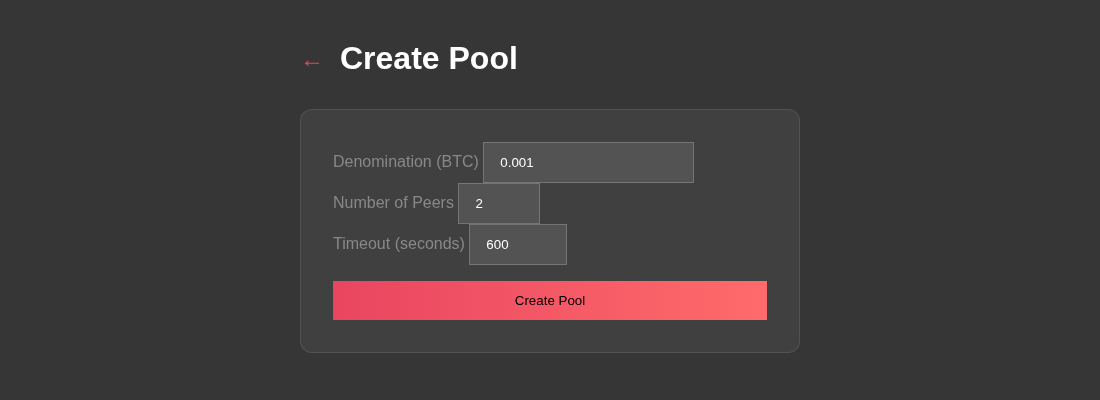
Create Pool asks for the denomination in BTC, the number of peers (2 to 10) and a timeout in seconds (60 to 3600).
-
Other Pools lists open pools on your relay. Click Join on one.
- My Pools lists pools you created or joined. A pool interrupted by a restart can be resumed from here.
After joining, the UI waits for credentials, registers a new address from your wallet as your output, then asks you to pick a coin in the required range. It signs that coin with SIGHASH_ALL|ANYONECANPAY, waits for the other peers and finalizes the coinjoin. It broadcasts through your node.